


Colossal Cave Adventure is widely considered to be the first known text adventure game. Will Crowther created it in 1975-6 for the Digital Equipment Corporation (DEC) PDP-10 computer, which was a mainframe system often used for research and academic work. He worked at BBN (Bolt, Beranek and Newman), a technology company in Cambridge, Massachusetts, on software for ARPANET’s IMP (Interface Message Processor). IMPs were the packet-switching nodes on the ARPANET, a precursor to the modern Internet. In their free time, Will and his wife, Pat, mapped cave systems in Mammoth and Flint Ridge, Kentucky. Their notes from exploring and mapping real caves informed the game’s layout, with many of its names directly matching actual cave features.
The original version was written in FORTRAN IV for the PDP-10, a mainframe computer with 36-bit words and limited memory. The program used an application file (the main program) and a separate data file (information the game used), both loaded when the game started. This unusual structure, along with creative ways of coding data files, lets everything fit into the computer’s memory. By chance, it also made the application easier to understand and modify for other computers, once some special, DEC-specific coding quirks and compiler behaviours were fixed.
Motivation
I’ve been playing with LLMs and AI coding tools for a while. I wanted a decent project to test them out. My plan was to take Don Woods’ expanded 350-point adventure game in FORTRAN and convert it for the web. This would make it easy for modern audiences to access. I looked at the earlier FORTRAN IV code by Crowther and the later PDP-10 version by Woods, but I couldn’t get a modern FORTRAN compiler to parse either. So, it seemed smarter to use a more recent version.
[ For the interested, the original Don Woods version can be found on the ifarchive here. ]
My restriction for this project was to keep it functionally as close to the original as possible, without changing the game’s core logic or behaviour. It needed to look and feel exactly like it would have in 1977. However, like many of my projects, this wasn’t exactly practical.
Plan A: Direct translation
My first plan was to test whether any of the main LLMs available in late 2025, when I began this project, could take FORTRAN and directly translate it into compilable C code.
TL; DR They could not, not even close.
These FORTRAN versions of Adventure aren’t huge, but LLM context windows were small. In extended conversations, LLMs lost context and became forgetful. At best, I managed a basic structure and a few converted functions at a time. ChatGPT compacted responses, omitted content, and was inconsistent. I tried Gemini, Claude, and Grok over the course of weeks, but none could reliably translate this legacy code; completeness was never guaranteed.
Plan B: Build an interpreter?
My next approach was to build a FORTRAN interpreter as an intermediate step for WASM. The game is text-based, so users wouldn’t notice small delays. This approach was naive. I underestimated the challenge of building a fully functional FORTRAN interpreter, even for just the subset used in Adventure. Grok made more progress than other LLMs, but could handle only about 20% of the necessary features, and only the simpler ones. After a week or two, I hit the limits of LLMs, and code quality began to drop, making this an uphill battle.
In retrospect, I think this approach could have worked if I had been better, at least at that time, at using these tools and prompting in a structured way. However, I wasn’t able to make any meaningful progress.
Plan C: F2C
F2C has translated old FORTRAN codebases for years. Although mechanical and not idiomatic C, it’s reproducible if it works—which is all we need. F2C keeps a FORTRAN-like execution model, converting arrays to pointer-indexed buffers and mapping I/O calls to runtime helpers. Much is implemented as library calls. The code is verbose and may seem odd to C purists, but it compiles and stays true to the original.
I ran into several issues along the way, but this method produced viable code. It preserved the core game logic, which was what I wanted.
Environment
My development environment was a Fedora Linux desktop on x86_64. Any modern Linux distro should work similarly. It should also be simple to reproduce the process on macOS or Windows using WSL.
I installed:
- gfortran for codebase testing
- f2c for machine translation
- emscripten for compiling to WASM.
You just need a modern web server and a web browser with JavaScript enabled.
FORTRAN Bashing
Dan Nelson ported the original PDP-10 Woods/Crowther version to ANSI FORTRAN 77 in the ’80s. I found a copy on ifarchive.
This didn’t quite compile with the modern gfortran compiler due to some differences in the syntax of a formatted WRITE command:
56794 WRITE(*,'/(A)')'ERROR: Failed to read from the save file
This is wrong because the format should have the slash inside the parentheses, like this:
56794 WRITE(*,'(/A)')'ERROR: Failed to read from the save file
There were only three instances of this error. Fixing them took mere seconds. Next, the final two functions in the file—UPCASE() and SETBIT()—looked wrong and didn’t compile.
The first needed to be tweaked a bit like this:
C  ADDED IN THE PORT: UPPERCASE A 5-CHARACTER ARRAY
      SUBROUTINE UPCASE(S)
      CHARACTER*5 S
      INTEGER I
      DO 10 I=1,5
         IF (S(I:I).GE.'a' .AND. S(I:I).LE.'z') S(I:I)=CHAR(ICHAR(S(I:I))-32)
   10 CONTINUE
      END
The second needed to be totally rewritten to get anything to work:
C  ADDED IN THE PORT: SET BIT N OF AN INTEGER VALUE
      SUBROUTINE SETBIT(VAL,N)
      INTEGER VAL,N
C     Statement function to test bit N
      LOGICAL ISSET
      ISSET(I,N)=MOD(I/2**N,2).NE.0
      IF(.NOT.ISSET(VAL,N)) VAL = VAL + 2**N
      END
(Actually, this LLM-generated snippet is only broadly correct, but for the range of values the application uses, it will work just fine.)
This produced a FORTRAN source file, which we’ll call advent_fixed.for.
While this Nelson version ran, it tried to open ADVENT.BIN in /etc for saving and reloading game state. I chose not to support SAVE and RESTORE to keep web deployment simple. Instead of fixing the save system, I had ChatGPT bypass these features and inform users they were inaccessible. The original PDP-10 core save/restore made no sense on UNIX, and Nelson’s method just wrote to a binary file. I could have added browser compatibility, but saw little benefit.
Anyway, once this version was running correctly on the console, I remembered about Wizard mode.
Say ‘NO’ to the Wizard (mode)
When Don Woods deployed his updated version of the game onto the early ARPAnet-connected computer network at Stanford in 1977, it caused quite a stir and raised several issues. Students and programmers became obsessed, burning hundreds of hours of expensive computer time trying to beat it. If rumours can be believed, some students even fell behind in their studies. Don needed to do something. The solution was to add an early form of rate limiting: access to the game was restricted during normal business hours, with an administrator-only mode that could be unlocked.
The game presented this mechanism in the form of defined ‘Opening Hours’ followed by a prompt asking if you were a wizard. If you answered that you were, then it would go on to prompt you for a trivial magic word, followed by giving you a seemingly random five-letter code. The challenge was to determine the correct response code to unlock wizard mode. This was non-trivial without the source code, as it required knowledge of the specific algorithm. Anyway, I don’t want any of this stuff, so I asked ChatGPT to review the code and bypass it as well. We just want to play the game without barriers, so sacrificing this feature, despite its historical relevance, is acceptable.
If you really want to try it, you’ll need to understand the algorithm in the original program. Wizard mode is unlocked in this build only by issuing the MAGIC command and completing the correct sequence. Enter DWARF to reach the prompt and find out what it thought the word was, which then lets you calculate what it is now.
magic mode
ARE YOU A WIZARD?
yes
PROVE IT!  SAY THE MAGIC WORD!
dwarf
THAT IS NOT WHAT I THOUGHT IT WAS.  DO YOU KNOW WHAT I THOUGHT IT WAS?
no
SQFAY
CQKZG
OH DEAR, YOU REALLY *ARE* A WIZARD!  SORRY TO HAVE BOTHERED YOU . . .
DO YOU WISH TO SEE THE HOURS?
If you want to experience what it was like to be a student in the late ’70s trying to hack the system to let you play longer, then you can try to solve the challenge cryptographically, or at least try to work it out from the source code. It isn’t actually a cipher, but a simple pseudo-random number generator seeded by the local system time and date; cryptanalysis techniques still apply.
When you give up, you can unfold the code solver below and use the handy code calculator I created.
FORTRAN-to-C
F2C is mature, widely available software, but on Fedora, I couldn’t get the standard libf2c to link with the generated C code. I rebuilt the library from netlib.org sources, which was required for the next step anyway.
I intended to compile and run the translated C code to verify correctness, but encountered a long list of issues at both compile time and runtime. Unfortunately, I didn’t take good notes on this process beyond many ChatGPT threads, but I did eventually get to a working set of source files.
There were several incompatibilities between the generated C code and modern standards, which I’ll try to recall…
TIME() and LTIME()
I needed wrapper functions to translate the modern time() and localtime() functions to what the F2C code expected. ChatGPT identified this and wrote the wrapper layer for me, saving me a few headaches. The source file timewrap.c contains this code.
I/O Function Weirdness
The way F2C maps FORTRAN I/O functions to C equivalents is very strange, and in the generated code, rather broken. The generated code included function prototypes that differed from the function definitions in the same file! After sorting out that mess, there were a lot of issues with mismatched data type sizes, collisions between the definitions of basic functions like min(), max() and abs(), as well as missing data table initialisers in the F2C-emitted code. Once those issues were squashed (with a lot of back-and-forth debugging thanks to ChatGPT), I was able to run the C code version of the game on the console and progress to the next stage.
Table Initialisations (or not)
The ‘missing data table initialisers’ refers to these array declarations in the FORTRAN:
C
C  CHARACTER VARIABLES, FUNCTIONS ADDED IN PORT
C
      CHARACTER LINTXT*(TXTMAX),AA,ATAB*5,PHROG*5,WD1*5,WD1X*5,WD2*5,
     1 WD2X*5,BLANKS*5,A1*1,A5*5,MAGIC*5,HNAME*5,MSG*5

      COMMON /TXTCOM/ RTEXT,LINIDX,LINTXT
      COMMON /BLKCOM/ BLKLIN
      COMMON /VOCCOM/ KTAB,ATAB,TABSIZ
      COMMON /PLACOM/ ATLOC,LINK,PLACE,FIXED,HOLDNG
      COMMON /MTXCOM/ MTEXT
      COMMON /PTXCOM/ PTEXT
      COMMON /ABBCOM/ ABB
      COMMON /WIZCOM/ WKDAY,WKEND,HOLID,HBEGIN,HEND,
     1  SHORT,MAGNM,LATNCY,SAVED,SAVET,SETUP,MAGIC,HNAME
      COMMON /MOTCOM/MSGLIN,MSG
TABSIZ is initialised in the original FORTRAN via a DATA statement attached to a COMMON block. In the translated C, that should become a global initialiser, and in my current build, it does. However, during porting, I encountered at least one build where that initialisation did not survive cleanly, leaving TABSIZ at 0 and causing the vocabulary (data table 4 in the advent.dat) loader to fail immediately. I added a tiny constructor-based guard to force it back to 300 before startup. In the final build, this may be redundant, but it was a useful defensive fix while stabilising the tool chain. This is the function of the code in advent_common_init.c: it duplicates the structure of struct voccom_1_ before dropping a runtime guard for the TABSIZ member, which runs before main() starts, to force it to the correct value, no matter what code F2C emits.
struct voccom_1_ {
    integer ktab[300];   /* KTAB(300) */
    char    atab[5*300]; /* ATAB(300) as A5 -> 5*300 bytes */
    integer tabsiz;      /* TABSIZ scalar, should be 300 per DATA */
};

/* This symbol is defined by your f2c-generated C from the FORTRAN COMMON. */
extern struct voccom_1_ voccom_;

/* Run before main(): set TABSIZ if the DATA init didn't land. */
static void __attribute__((constructor)) init_common_sizes(void)
{
    if (voccom_.tabsiz <= 0) {
        voccom_.tabsiz = 300; /* from FORTRAN: DATA ... TABSIZ/300/ */
    }
}
Cross-compiling to WASM
Once a stable C code build was secured, it was necessary to recompile libf2c with emscripten. Luckily, it’s quite easy to hack the libf2c Makefile to replace gcc with emcc and emit a library that can be linked to WASM. I did have trouble getting the library to compile cleanly, so I removed the functions that the C code didn’t require to minimise the number of bug fixes. Of course, this means the libf2c-for-emcc library is only useful for this project, but that’s acceptable given the one-off project flow.
Why Web Assembly?
Web Assembly (WASM) is a binary format for a virtual machine embedded in all modern web browsers. It’s intended for embedding small application cores, optimised for speed, predictability and sandboxing, and is closely integrated with the JavaScript environment, enabling it to operate seamlessly on any supported platform. It’s perfect for embedding custom code, with a small performance penalty. It enables running more intensive applications on the user’s computer in a predictable manner, rather than on the web server. This matters when you scale to large deployments. All processing runs on the web browser, after fetching resources from the cache layer. This means that if you have a robust CDN or cache application, such as Cloudflare, it takes the hit for multiple user downloads, not your web server, so it performs just as well whether you have 10 users or 10,000
The WASM sandbox can’t affect the DOM directly; it can only do so via defined exported functions and shared memory objects. Nor can it open a socket or access files directly, making it quite secure by default. The JavaScript that instantiates it and wraps its functionality is responsible for those aspects. That said, it is not difficult at all to give WASM access to files on the server, provided you explicitly allow it, or roll them into a data blob and package them with the WASM program. There are plenty of ways to skin that particular cat.
Emscripten
There are a few ways to implement WASM, but I chose Emscripten for no particular reason other than it is functionally very close to the classic GNU build programs. For example:
| GNU | Emscripten | Notes |
|---|---|---|
| gcc | emcc | compiler / linker |
| ar | emar | static library archiver |
| nm | emnm | display symbol table |
| strip | emstrip | remove debug info / unused sections |
| ranlib | emranlib | static library indexer |
Building libf2c
In this case, building libf2c and compiling the F2C-generated C code to WASM is as simple as replacing one tool with its equivalent, provided the build environments are compatible. For libf2c, I edited the Makefile and changed these definitions:
Fix the compilation step:
compile, then strip unnecessary symbols
.c.o:
emcc -c -DSkip_f2c_Undefs $(CFLAGS) $*.c -o $*.o
# ld -r -x -o $*.xxx $*.o  <-- not needed
# mv $*.xxx $*.o <-- nor this
Also, the library archiver:
libf2c.a: $(OFILES)
emar r libf2c.a $(OFILES)
emranlib libf2c.a
Building the colossal cave adventure
Just throwing the translated C code and the library at emcc did not work. There are several issues to work through. The major one was how to handle console I/O. With the traditional command-line Advent application, things are pretty straightforward: the game loads and parses the data file to initialise a bunch of arrays, then prints the welcome messages, and blocks until a line of text is entered in reply. When the user presses enter, the game parses the response, performs appropriate actions, prints out more text, and the cycle repeats.
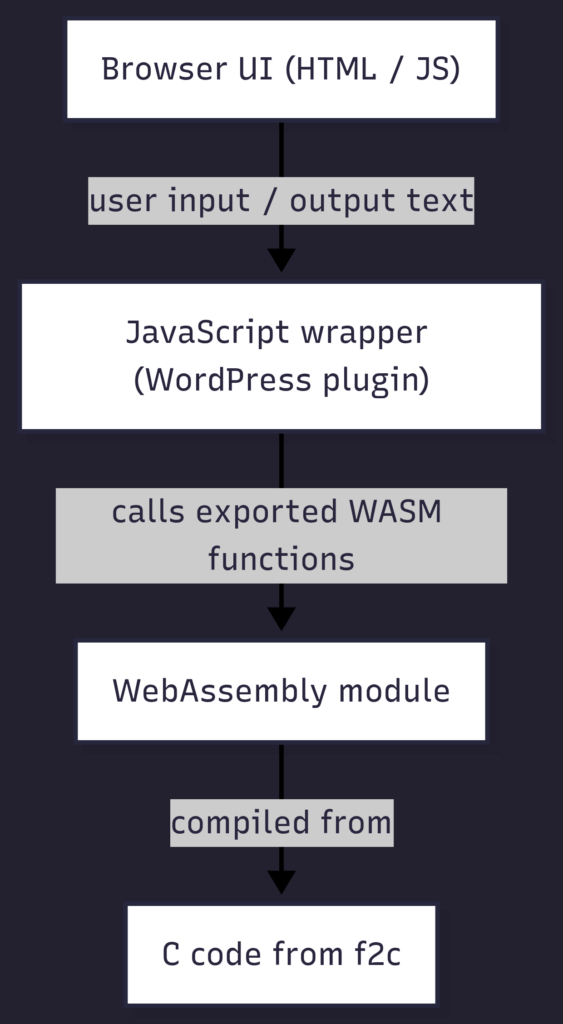
However, when running in a web browser, such naive synchronous input behaviour blocks the main thread, freezing the page. Direct terminal I/O can be simulated easily enough, with text sent to a simple scrolling text widget, and text typed into an entry box passed to the game, but this blocking is the killer.
Fixing this was awkward, and unfortunately, I did not keep particularly good notes. The core problem was that the libf2c implementation of console input assumes a synchronous terminal environment, which does not translate well to a browser. In the original program, the game blocks indefinitely while waiting for user input via the getin_() routine. That behaviour would freeze the page if used directly inside WebAssembly.
To solve this, I wrote a small shim (getin_shim.c) that overrides getin_(). From the perspective of the compiled Adventure code, nothing changes; it still calls getin_(), expecting a line of input, but the shim redirects the request to a JavaScript helper function named get_js_input(). The JavaScript side uses Emscripten’s ASYNCIFY feature, which allows a WASM module to suspend execution by unwinding its stack into a resumable state. If get_js_input() finds no input available, the module simply goes to sleep. When the user submits a line of text in the browser UI, execution resumes exactly where it left off, the game processes the command, emits new output, and then returns to the waiting state. When resumed, getin_() retrieves the text string from the JavaScript side and converts it to the format the FORTRAN model expects. The surrounding DOM and JavaScript environment continues to run normally throughout this process, so the page remains responsive rather than locking up.
To support this async/sleeping behaviour, you need to add emcc compile flags like these:
-sASYNCIFY \
-sASYNCIFY_IMPORTS=‘[“get_js_input”]’
…etc…
Define each JavaScript function you want to allow to trigger suspension. In our case, suspension is needed only to block user text input.
These sorts of shenanigans are probably quite unusual for most WASM use cases, as most people seem to use WASM to package code that takes a set of inputs, performs a bunch of tight processing, and emits a response via shared memory. Having the WASM code in control of the wider application is less common, but still quite doable if you understand where the blocks are and how to mitigate them.
Adding Graphics
This project was all about exploring ideas for using LLMs and other AI tools to see what was possible and how easy it was to create interesting apps without worrying about real-world applications. My plan was to run Colossal Cave Adventure in a web browser, making it easy for users to access. I achieved that aim—but I wasn’t done yet; I wanted to add context-sensitive graphics above the description. I remembered that the original Colossal Cave Adventure was created by Will Crowther for his two daughters to help him bond with them after separating from his then-wife. So I decided that the graphics should look hand-drawn, as if imagined by a young child. I settled on a style of plain white line drawing with simple outlines on a solid black background. Caves are dark after all.
For the prompts, I used a fixed stylistic pre-prompt, which was appended with the room description taken directly from the advent.dat data file provided with the original FORTRAN source code.
As I alluded to earlier, the original game was split into two parts: program and data, in order to optimise program memory usage. The data file has a simple structure, based around sections of text. Each section is identified by a single integer on its own line. The defines the section type as follows:
| Section | Code Function | Notes |
| 1 | Long location descriptions | Room descriptions |
| 2 | Short location descriptions | Short form when returning to a room |
| 3 | Travel table | legal travel destinations with associated verb and conditions |
| 4 | Vocabulary table | Codes allowable user inputs with equivalents |
| 5 | Object descriptions | Descriptions of each object with object variants |
| 6 | Arbitrary messages | Narrative messages |
| 7 | Object initial placement | Moveable object initial locations. |
| 8 | Action defaults | Default fallbacks for action verb responses |
| 9 | Condition/Location metadata | Room properties, e.g. liquids, pirate restriction, etc. |
| 10 | Class score messages | Player ranking text |
| 11 | Hints table | Hint behaviour, triggers and penalties |
| 12 | Magic / maintenance messages | Maintenance mode messaging |
| 0 | terminate marker |
Each section has a variable number of lines and is terminated by a single -1 value on the following line. Each line in a section starts with an integer immediately followed by either text or a series of integers separated by spaces, depending on the section type.
Three of the sections were useful for this project: the room description was used to create the room images, object descriptions were used to create images of objects to overlay onto the rooms, and the object placement table was used to determine where to place objects.
I did find it a bit of a challenge to get ChatGPT to create simple enough images; it really wanted to add details I didn’t want. I chose to let the description guide the viewport orientation, which usually means west is left, and east is right, but sometimes I had to manually adjust the prompt to orient the image so it made sense, or guide visualisation from a very vague description.
The images produced were noisy, antialiased PNG files that averaged around 1.5 MB. I decided to give the graphics an early-8-bit vibe and convert them to black and white while keeping a decent resolution. Running them through GIMP manually, applying a threshold operation to reduce the colour depth to 1-bit, and exporting in WEBP format was all that was needed to reduce the average image size to about 80 kB. The threshold operation reduces the colour information to just two, resulting in a significant reduction in information and, consequently, data. The WEBP format is very efficient at encoding large, uniform areas and reducing colour palette information, keeping images with little information small once they hit disk. This all helps reduce load on the web cache infrastructure, keep bandwidth low, and make page loading nice and snappy.
Prompting
When I started creating images, I was not working in a particularly structured way; I merely prompted with what felt like short essays to guide the style toward what I wanted. Eventually, ChatGPT Images was creating what I needed, and ChatGPT learned to follow and maintain the style, but I still had to restart new threads when it started to regress and add too much detail.
I probably should have learned about JSON prompting sooner, such as this example that captures the style of the images I was working with:
{
  "prompt": "extremely minimal white line drawing of a cave entrance, viewed from inside looking outward, drawn as if by an 8-year-old child, very simple and sparse, only essential outlines, no filled areas, no shading, no textures, no crosshatching, no detail except a few accent lines, thick uneven hand-drawn white lines on a pure black background, a single large rounded cave opening, a small simple arched doorway on the right, a few oval stepping stones loosely indicated in the foreground, a very simple rectangular grate above the opening, everything drawn with as few lines as possible, naive and imperfect proportions, lots of empty space",

  "style": {
    "line_quality": "thick, uneven, wobbly, hand-drawn",
    "color_palette": "strictly white lines on black background only",
    "detail_level": "extremely low",
    "aesthetic": "childlike sketch, primitive outline drawing"
  },

  "composition": {
    "perspective": "first-person interior cave view",
    "elements": [
      "one large cave opening",
      "one small doorway on right",
      "few stepping stones",
      "simple grate above"
    ],
    "layout": "very simple, loosely centered, not precise"
  },

  "constraints": {
    "max_line_count_feel": "very low, every line must feel necessary",
    "empty_space": "dominant",
    "object_simplification": "extreme"
  },

  "rendering": {
    "background": "solid black",
    "line_color": "white",
    "line_thickness": "medium to thick",
    "shading": "none",
    "fill": "none"
  },

  "negative_prompt": "color, grey, gradients, shading, lighting, shadows, textures, realism, detailed rocks, fine detail, crosshatching, dense linework, sketch shading, filled shapes, smooth clean vector lines, polished illustration, 3D appearance, high detail, clutter"
}
This is, however, very long-winded, even if it is revision-controllable. A better, more modern representation is TOON, which removes much of the unnecessary (to an LLM) structural clutter and boils it down to the essentials. ChatGPT converted the JSON prompt above to this TOON representation, which generates images exactly as I want them:
TOON: ultra-minimal childlike cave line art, first-person view from inside cave looking out; one large rounded opening, small arched doorway on right, few oval stepping stones, simple grate above; thick wobbly white lines only, no fill, no shading; pure black background; extremely sparse, lots of empty space, naive proportions, very few lines.

NEGATIVE: color, grey, gradients, shading, shadows, textures, realism, detail, crosshatching, dense lines, smooth vector, 3D, clutter
Wrapping it all up in JavaScript
The next step to actually running the WASM version of the game in the browser is to embed it inside a simple JavaScript application. I’m running WordPress, so to make it easy to deploy applications to the site, I wrap them as plugins. To embed the app on a page, I use the WordPress shortcode trigger within the main PHP application, so all I need to do is insert a single block with trigger text. So yes, that’s now four different programming languages to deal with. It’s a good thing that modern LLM tools are so flexible, because I really hate programming in PHP and JavaScript!
A quick aside before we continue regarding WordPress plugins. For many plugins available in the marketplace, you need to be very careful about which ones you install and how many. Some of them include JavaScript code loaded on every page of the site. Excess plugin clutter can dramatically increase page load times, place extra load on the server, and slow down page execution. In short, too many plugins are a bad thing. I want to add a lot of interactive content to this site, so I need to ensure that my JavaScript code is only loaded and instantiated when the page includes the shortcode that triggers the application. Early versions of my PHP code indeed behaved badly, but I found a way to lazy-load the application only on the desired pages, keeping things minimal and tight. So, if you follow my example, do bear that in mind. Anyway, we’ll come back to this shortly.
Reading Game State
The problem of getting text in and out of the game core had already been solved, but I needed a way to determine in which room the player was located and which objects were visible. One method I considered was to use the room description code, hash it, and map the resulting hash to the room location code. However, I decided that a simpler method was to add helper functions to the C code that peek at the global game-state variables and determine the system state from them. There are only a small number of arrays that hold all the interesting state information. It turned out that ChatGPT had a good understanding (if you can call it that) of how the game worked and could easily determine the state of various objects and export them to the JavaScript layer for visualisation. In addition to peeking at the original game state variables, I added a few flags to help determine the system state. There isn’t actually a variable that tracks if the player is dead or alive; it’s more of a transient state in between reincarnation attempts. It was necessary to modify a flag during these transitions so the JavaScript layer could track it and display the correct image. This is one of the very limited number of additions I made to the C code simply to track state. The game logic is not affected in any way.
The entire world state of Adventure is held in a handful of arrays. loc stores the player’s current room number, place[] records where each object currently resides, fixed[] tracks immovable objects, and prop[] stores state flags for objects and puzzles. Because the F2C translation preserves these structures directly, I could expose them through small helper functions and query the game state from JavaScript.
The C code hosts a set of ‘PEEK Pointers’ that are used to point to the state variables that code what objects are where and their states:
/* ---- PEEK POINTERS TO LOCAL VARS FOR SNIFFING BY JS RUNTIME -----*/
advent_loc_ptr = &loc; // Current location
advent_oldloc_ptr = &oldloc;
advent_newloc_ptr = &newloc;
advent_dflag_ptr = &dflag;
advent_dloc_ptr = &dloc[0];
advent_odloc_ptr = &odloc[0];
advent_dseen_ptr = &dseen[0];
These are dereferenced and exported (as integer values) by the corresponding EMSCRIPTEN_KEEPALIVE functions. (These are not the actual functions that match the above declarations, merely an example of the sort of function to be found in the full code.)
EMSCRIPTEN_KEEPALIVE int get_current_location(void) {
    if (!advent_loc_ptr) {
        return -1;
    }
    return (int)*advent_loc_ptr;
}
…
EMSCRIPTEN_KEEPALIVE int get_object_prop(int obj) {
    if (!advent_prop_ptr) {
        return -9999;
    }
    /* Object numbers in this codebase are 1..100 (see prop[100]) */
    if (obj <= 0 || obj > 100) {
        return -9999;
    }
    return (int)advent_prop_ptr[obj - 1];
}
There are many more defined than these two; this is just a taster. This was the simplest mechanism for strategically exporting the game state to the JavaScript layer above. The status of many objects is stored in the prop[] array, which uses fixed object numbers as the index into this array. The get_object_prop() function simply dereferences advent_prop_ptr, then marks it for export with the EMSCRIPTEN_KEEPALIVE decorator. There is no magic here; it’s all very simple.
I did get a preliminary version of the application running, with all code written exclusively by ChatGPT and only a few manual hacks on my end, but I felt the code was getting a bit long and hard to read. The entire JavaScript lived in a single massive file, play.js, which hosted both the loader and the main application. At over 1000 lines, it was clear this was hitting ChatGPT’s limited context window hard, and I kept having to repeat myself or start new threads to undo regressions and keep the project on track. I had been reading quite a lot about more integrated tools like Claude Code and Cursor, but didn’t want to pay for a second subscription, especially since, at the time (mid to late 2025), ChatGPT’s code quality was significantly better than the competing models.
Fast forwarding a little to closer to the present day, OpenAI released Codex-5.3, and I decided to take the plunge and set up the Codex plugin for VS Code. This was a solid move: the integration worked well, and it could use my existing ChatGPT-Plus subscription directly, so there was no extra cost. I asked ChatGPT how to set up Codex properly, created a preliminary AGENTS.md to guide the project, and let it rip on a complete project refactor. Other than half an hour of debugging a few mistakes, I got back to a running state, but this time I had a properly integrated flow, a manageable number of much smaller, targeted files, and the development rate and accuracy jumped dramatically.
Code Structure
The JavaScript is contained in six files, roughly as follows:
play.js: This is the main loader, as kicked off by the PHP shortcode handler. It locates the root DOM element, sets up runtime variables, creates the UI, renderer and bridge objects, loads the emscripten WASM image, and wires everything up. This is largely reusable code that I may keep in place for future projects.
bridge.js: This is the WASM<->JS integration layer. It handles the asynchronous input bridge, getting text in and out of the game core without stalling the DOM. It also handles binding the C exports, so we can read game state variables and poke state variables to allow disabling the dwarves, as well as a couple of debug functions to move around the game manually and spawn things. This code is highly specific to this use case, but some of the methodology could be reused.
renderer.js: This handles all the graphics. It selects and displays the background image using data from the bridge, overlays item and actor sprites, and handles timing so the image is composited correctly when the game state changes. This code is quite reusable, albeit functionally tied to this application.
ui.js: The user interface proper. This owns the DOM shell, the layout of all components, and handles resizing (especially important on mobile) elements, and defines the specifics of all elements, such as colours, style hints, and clearances.
config.js: This is where (nearly) all the configuration lives. It contains a lookup table that maps object numbers to filenames of the associated graphical assets. It also codes starting locations, initial image slot assignments and a per-image global scale factor.
library_getin.js: This is an Emscripten shim function that provides get_js_input(), which allows the browser to pause the game when awaiting user input, via the ASYNCIFY feature.
99% of this code was generated by prompting ChatGPT to produce reusable, fault-tolerant code that could be useful in the future, rather than tying it to this project. I don’t like JavaScript, so I was very pleased that the tool could generate working code, almost out of the box. Without ChatGPT to complete this, I would likely have left the project to gather dust and never completed it.
The Renderer
For most rooms, a single image is displayed, but for a handful, we need variants. The game has a few puzzles, such as the dragon reclining on the Persian rug. You need to dispatch the dragon to get past it and collect the treasure rug. I created an image from the room description, less the rug and dragon, as the base. Then I added the dragon on the rug by feeding the image back into ChatGPT and asking it to add the extra details. The dragon was colorised by hand using GIMP. Generally, this flow worked, but in a few instances, the background image shifted slightly. It was minimal, so I didn’t worry too much about it.
Then I re-read the descriptions of the dragon room. After you kill the dragon, it doesn’t just disappear; it is moved to one side, with the rug as a collectable. So I deleted the plain room image and kept the start image with the dragon on the rug, and the second one with the dragon upside down, looking dead, without the rug. This allowed me to present the rug as a smaller, collectable treasure.
I repeated this simple process for all the other major puzzles in the game, reducing it to the minimum number of images needed to show the state. On top of this, the collectable items and actors were layered.
The renderer maintains three compositor layers: a background layer for the selected room image or a state-specific variant, a middle layer for collectable items and treasures, and a top layer for actors such as the dwarves or the pirate. It turns out, though, when you see how the game works internally, that the pirate is never actually visible, only transiently.
I needed to decide—should I render intermediate states or only the final view? When the pirate appears, he steals a treasure and then immediately disappears again, all within the same turn, so if I’m just rendering the final state at the end of the turn, then the pirate is never actually displayed. I decided to keep things as simple as possible: render the final view at the end of the turn and let the commentary describe any transitions or temporary appearances. I did create a sprite for the pirate, but it is not actually displayable. Perhaps a future version could be extended to show a transitional state like this, or even an animation, and I’ll reuse the asset.
A Slot-Based Compositor
The image compositor is as simple as it gets. I decided that items could occupy the bottom third of the drawing area, dividing this region into three horizontal strips, each consisting of eight equal-width location ‘slots.’ The config.js file codes for an initial preferred slot number and a scaling factor for each displayable object, so I can specify where on the screen an item starts and have everything scale based on the viewport size. I added a fake depth layer by scaling the sprite up on the bottom (nearest) layer of slots and scaling down on the top layer. In practice, this doesn’t really show up much, since most rooms have only one item present at any given moment, and you can’t control where an item goes. The code has a preferred item slot, which, if occupied, is replaced at random.
A similar scheme is applied for the actor layer, with five slots in a single row down the bottom. The bear is special; he peeps around a corner when following you, rather than being rendered directly in the scene.
The downside of this approach concerns assembling the treasures in the building. It looks very crowded, and my weird rainbow treasure colouration scheme makes it look too busy. However, I don’t care enough to fix that.
What’s the point of the dwarves?
I was about to create the dwarf image when I paused for a moment. What’s the point of dwarves? I mean, you wander around the cave, mapping it manually, trying to figure out the simple (but weird) puzzles and then all of a sudden, you’re randomly dead and have to start again. They don’t actually add anything to the game other than randomly ending it and adding frustration. So, I added a mechanism to bypass the dwarf logic processing and hooked it up to a checkbox at the application layer. This promptly broke the pirate. Turns out the game treats the pirate as a dwarf for movement (albeit with different behaviour flags), so I needed to adjust the code slightly to skip dwarf processing and let the pirate run. After all, we need him to steal a treasure so we can take it back later when we find his treasure chest. (Oops! Spoiler! My bad.)
The EMSCRIPTEN_KEEPALIVE The functions I showed earlier can also work the other way: you can write values into the WASM core from the outside, pulling them from UI elements, if you wish. In my case, it was a single checkbox and a few debug commands I wedged in to assist with debugging.
/* --- JS option hook: disable dwarves ----------------------------- */
static int advent_disable_dwarves = 0;

/* Exposed to JS: 0 = dwarves enabled (default), 1 = dwarves disabled */
EMSCRIPTEN_KEEPALIVE void set_dwarves_disabled(int disabled) {
    advent_disable_dwarves = disabled ? 1 : 0;
}
Not the cleanest code around, but I could see why ChatGPT kept following this style, so I left it as is. The advent_disable_dwarves flag is tested in a few places in the game code, allowing processing of the annoying little people to be bypassed. For example, in the game:
/*  SEE IF A DWARF HAS SEEN HIM AND HAS COME FROM WHERE HE WANTS TO GO.  IF SO, */
/*  THE DWARF'S BLOCKING HIS WAY.  IF COMING FROM PLACE FORBIDDEN TO PIRATE */
/*  (DWARVES ROOTED IN PLACE) LET HIM GET OUT (AND ATTACKED). */
L71:
    /*  DRO: ADDED dwarf disable hook*/
    if (advent_disable_dwarves) {
        goto L74; /* no dwarf blocking */
    }
As I said earlier, the whole point of picking this particular game was to keep it as authentic as possible, but I have to be practical about details like operating hours, and also a modern audience’s staying power in the face of a totally unnecessary and random foe like the dwarf. So I don’t feel bad about it.
Visualisation Flow
The control flow is very simple. The game runs its turn, changes any local variables to track state, then emits a pile of text strings. This triggers the Emscripten print callback in the bridge module, which appends the string to the text area and then calls refreshRoomVisuals() to update the scene. The renderer then pulls the latest values from the WASM core via the bridge module to determine whether the room image needs to be swapped and to retrieve the states and properties of other items. Finally, any items present are rendered.
refreshRoomVisuals() is actually called in several scenarios, but the main path is when all text has been displayed, and the turn changes to waiting for user input.
In the code, the flow looks like this:
- Grab the current room location with
bridge.getCurrentLoc() - Check if the player has kicked the bucket with
bridge.getPlayerDead()- If true, swap the image to
you+dead.webp
- If true, swap the image to
- Get the lamp property with
getObjectProp() - Grab room condition bits with
getLocationCond() - Locate the lamp with
getObjectPlace() - Decide if the room should be dark.
- If yes – call
updateRoomScene(loc, 'dark')to blank the image
- If yes – call
- Check if a room variant image is needed with
handleSpecialLocations(loc) - Finally, call
updateRoomScene()to piece together the image like this:setRoomImageByKey()to swap the image to the correct backgroundrenderRoomItems()to place the collectable thingsrenderDwarves()to place those pesky dwarves
Lazy Loading
Whilst not necessarily relevant for this application, I added some code in play.js to defer loading of the game widget until it is within the viewpoint. This uses the IntersectionObserver object, if available, to detect where in the page the user is viewing. If the widget never scrolls into view, we don’t waste resources loading it. If the feature is unavailable, the code falls back to starting immediately. This follows the theme of building reusable code for future developments and feels like generally good practice.
Error Handling and Restart
One small but important engineering challenge was how Emscripten reports program termination. A clean exit from the WASM module does not always return a neat value; in practice, it often appears in JavaScript as a rejected promise containing an ExitStatus object. To avoid it looking like a frontend crash, I added a global unhandled-rejection hook that catches these ExitStatus events, converts them to normal shutdown messages, and forwards them to the currently active game session. On top of that, each running session has its own local exit handler, which disables the input field, shows a restart button, resolves any outstanding async input wait so the engine is not left hanging, and then reapplies the layout. Restarting is handled by simply tearing down the old UI listeners and booting a fresh module instance into the same page element. It is not glamorous, but it is robust, and it makes the whole application feel much more like a finished piece of software than a loose tech demo.
Conclusion
By the time this project was finished, the technology stack had become slightly ridiculous. A FORTRAN IV program from the mid-1970s was translated into C using F2C, compiled to WebAssembly with an LLVM-based toolchain, wrapped in a JavaScript application, and finally embedded in a PHP-driven WordPress plugin. None of those layers existed when Adventure was written.
And yet, the game itself barely changed.
The cave system, the puzzles, the strange logic, and even most of the quirks are exactly the same as they were in 1977. The program still reads a line of text, updates a handful of arrays, and prints out what happened. Everything else is just infrastructure to make that loop run somewhere new.
In the process, I discovered a few interesting things. Large language models are very good at generating glue code and helping navigate unfamiliar toolchains, but they are not particularly reliable when asked to translate large legacy programs wholesale. Old software can be surprisingly resilient if you respect its assumptions. And WebAssembly turns out to be an excellent platform for running strange historical programs that were never meant to run in a browser.
Most importantly, it confirmed something slightly charming about early software design: when programs are simple enough, they can survive enormous changes in computing environments. A cave map scribbled down in Kentucky in the early 1970s can still be explored today on a laptop, tablet, or phone.
The only real difference is that the cave now lives in a browser tab rather than on a PDP-10 terminal.
And fortunately, nobody is charging you for CPU time anymore.
— GMG
Note: For hints and help, the version of this application on the dedicated page here will be more helpful.
References
Rick Adams provides some excellent references and many hints on his site.
If you want a more modern implementation of the game, you could try Colossal Cave 3D by Roberta Williams of King’s Quest fame, on Steam, or even on the Meta Quest VR.